SaaS vs Custom AI Build — When to Use Which
I build custom AI solutions for Indian SMEs. And I’m about to tell you every situation where you should NOT hire someone like me.
“SaaS ya custom?” — yeh sawaal mujhe haftey mein do baar aata hai. The answer depends on three specific things you can evaluate in about ten minutes. Let me walk you through the framework, with real examples from Indian businesses.
When SaaS wins — and wins clearly
Accounting and tax compliance. Tally is Tally. ClearTax is ClearTax. If your problem is standard bookkeeping, GST filing, ITR filing, TDS returns — buy the SaaS. These are solved problems. The compliance rules are the same for everyone. The filing formats are standardized by the government. ClearTax has spent hundreds of crores building something that handles this well. You cannot and should not try to custom-build your way out of a GST return.
Basic e-commerce. Shopify India. WooCommerce. If you’re selling products online with a standard catalog and standard checkout, the platforms exist and they work.
Standard HR and payroll. GreytHR. Keka. Zoho Payroll. If you have 10-200 employees, standard attendance, standard salary structures — these tools handle it.
Simple CRM — if your team will actually use it. That’s a big “if,” and I’ll come back to it. But if you have a dedicated sales team that’s disciplined about logging activities, Zoho CRM or HubSpot will serve you fine.
The pattern is clear: when the problem is generic and the workflow is standard, SaaS wins. You’re sharing development costs with thousands of other businesses who have the same problem. Economies of scale work in your favor.
When SaaS fails — and nobody tells you why
Here’s where it gets interesting.
SaaS tools are designed for the average user. They solve the 80% case well. But Indian SMEs don’t live in the 80% case. They live in the messy, specific, Hinglish-speaking, WhatsApp-first, Tally-dependent, jugaad-powered 20% that no Silicon Valley product manager has ever mapped.
The 80/20 gap
A CA firm I know signed up for a practice management SaaS — international product, well-reviewed, proper pedigree. It handled client management, task assignment, document storage, and billing. Covered 80% of what they needed.
The 20% gap:
- Couldn’t read documents sent via WhatsApp and auto-file them to the right client
- Couldn’t parse a photo of an invoice and extract line items into their review workflow
- Couldn’t connect to Tally to cross-reference billing against actual accounting entries
- Couldn’t send automated WhatsApp reminders to clients for pending documents (only email, which their clients don’t read)
That 20% gap? That’s where 60% of their team’s daily frustration lived. The tool did everything except the parts that were eating their time.
Same story, different industry. An auto parts distributor in Nashik used a CRM for order management. It tracked leads, sent email follow-ups, generated reports — the standard 80%. The 20% it couldn’t do: parse incoming WhatsApp messages from buyers who send orders as voice notes or photos of handwritten lists, match those against the rate sheet in Excel (with 3,400 SKUs across 6 price tiers), and generate a quotation in the format the buyer’s procurement team expected. That 20% was the entire order intake workflow — the thing the distributor actually needed a system for. They were paying ₹48,000/year for a CRM while their real process still ran on WhatsApp and a guy named Sachin.
The adoption problem — the real reason SaaS fails in India
This might be the most important section in this post.
Most SaaS tools assume your team will adopt a new interface. Open a browser, log into a dashboard, update records, check notifications. That assumption works in companies where employees live in front of laptops.
In Indian SMEs — especially factories, field services, and small professional practices — your team lives on WhatsApp and phone calls. Asking them to “check the dashboard” is asking them to change a deeply ingrained habit. And habits don’t change because you bought a subscription.
The gap isn’t features. It’s form factor. I’ve watched a ₹50,000/year SaaS subscription go completely unused — not because it lacked functionality, but because the team’s workflow was WhatsApp-native and the tool was browser-native. The salespeople didn’t refuse the tool. They just… kept using WhatsApp. Every morning the manager would remind them to “update the CRM.” Every evening the CRM sat empty. Aadat nahi badlegi subscription se.
The integration problem
Indian businesses run on a specific stack: Tally for accounting (overwhelmingly), WhatsApp for communication, Excel for everything else, and maybe Google Drive for document storage. This stack is unglamorous and deeply entrenched.
Most global SaaS tools integrate well with Salesforce, Slack, QuickBooks, and Zapier. They integrate poorly — or not at all — with Tally, WhatsApp Business API, and the specific Excel formats that Indian businesses actually use.
So you end up with a new tool that doesn’t talk to your existing tools, which means someone on your team becomes the manual integration layer — downloading from one system, uploading to another, copy-pasting between screens. You’ve added a tool but also added work.
When custom AI makes sense
Custom doesn’t mean expensive. Custom doesn’t mean complex. Custom means: built for your specific workflow, your specific data, your specific team.
Here are the situations where custom wins every time:
Your workflow is specific to your business. “Connect my Tally data to my compliance calendar and WhatsApp me what’s overdue” — no SaaS does this because every firm’s compliance tracker is structured differently. A CA firm in Pune organizes by partner assignment. A CA firm in Chennai organizes by client type. A firm in Delhi organizes by filing deadline. Same profession, three completely different workflows.
Your data is messy. Your rate sheets have merged cells. Your client database is spread across three Excel files and a WhatsApp group description. Your vendor invoices come in 14 different formats. SaaS tools expect clean, structured input. Custom builds can handle the mess.
Your team won’t adopt new software. If your team’s primary interface is WhatsApp, build the solution inside WhatsApp. Don’t fight the habit — ride it. A custom WhatsApp-based system that requires zero behavior change will outperform a sophisticated dashboard that requires daily discipline.
The SaaS does 80% but the 20% gap is where the pain lives. If you’ve tried a SaaS tool and the parts that don’t work are exactly the parts that matter most — that’s a custom build signal.
The decision framework
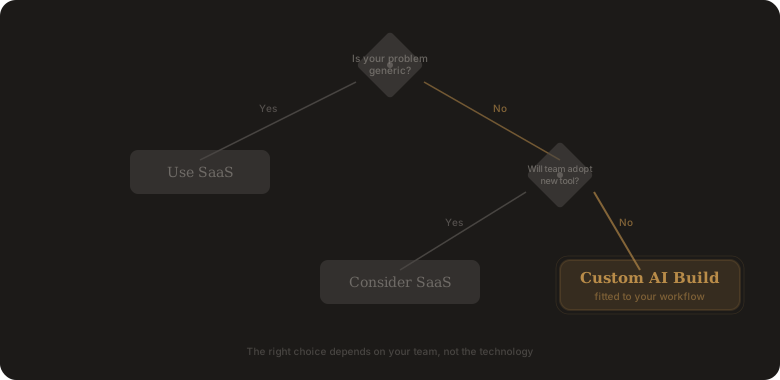
Three questions. Answer for your actual team, not your ideal team.
| Question | If Yes | If No |
|---|---|---|
| Is your problem generic? (Same as thousands of other businesses) | SaaS | Custom |
| Will your team adopt a new tool? (Based on past behavior, not hope) | SaaS | Custom |
| Is the 80% solution good enough? (The missing 20% doesn’t cause daily pain) | SaaS | Custom |
If you answered “Yes” to all three: buy SaaS. Seriously. Don’t overcomplicate it.
If you answered “No” to even one: custom is likely the better investment.
The pricing reality
Here’s the comparison people rarely do properly: the SaaS looks cheaper monthly, but over three years, a custom solution that you own — built exactly for your workflow, requiring no behavior change from your team — often costs less than a SaaS subscription that your team half-uses.
And there’s a hidden cost in SaaS that nobody talks about: the cost of partial adoption. When your team uses 40% of a tool, you’re paying for 100% of it. When the tool handles 80% of your workflow, someone is still manually handling the other 20% — which means you’re paying for the tool AND the manual work.
The real cost of custom builds after Year 1
“You own it” is technically true — but Year 2+ is NOT zero cost. WhatsApp changes their Business API every few months. Tally export formats update. Your hosting needs maintenance. If your workflow changes, the custom build needs updating too. Budget ₹5,000-10,000/month for ongoing maintenance and occasional fixes. It’s still cheaper than most SaaS subscriptions for the same functionality, but pretending it’s free after day one would be misleading.
What if the builder disappears?
Someone asked me this directly: “Agar kal tum band ho gaye, toh mera system kaun chalayega?” Fair question — and one you should ask any custom builder before signing.
The answer should be: you own the code, the deployment credentials, and the documentation. All three. If a builder won’t hand over all three, walk away. A well-documented custom build can be maintained by any competent developer. A poorly documented one becomes a hostage situation. Yeh cheez contract mein likhwa lo — baad mein poochhne se kuch nahi hota.
The hybrid approach
The smartest Indian businesses I’ve worked with use both. They use SaaS for generic problems and custom builds for specific ones.
Tally for accounting — SaaS. ClearTax for GST filing — SaaS. WhatsApp AI layer for client communication tracking — custom. Automated quotation system connected to their specific rate sheet — custom. Compliance reminder system that pulls from Tally and nudges on WhatsApp — custom.
Generic problems get generic solutions. Specific problems get specific solutions. Bas itna hi hai. No ideology, no loyalty to one approach. Just whatever works.
What I’d actually recommend
If you’re reading this trying to decide:
- Start with SaaS for the obvious stuff. Accounting, email, maybe project management. Don’t custom-build what’s already solved.
- Identify where the SaaS gaps hurt. Where does your team work around the tool? Where do they revert to Excel and WhatsApp despite having a “proper system”? Those gaps are your custom build candidates.
- Start with one custom build. Pick the single most painful gap. Build a focused solution. See if it works. If it does, build the next one.
I’ve seen businesses waste money on custom builds for problems that Tally already solves, and I’ve seen them waste money on SaaS subscriptions for problems that need a custom approach. The difference between the two is specificity: generic problem, generic solution. Specific problem, specific solution.
Run the three questions above on your biggest operational headache. If all three answers point to SaaS — great, go buy the subscription, you don’t need us. If even one points to custom — describe the problem here. We’ll tell you if it’s buildable in a week, or if you should keep looking.